Introduction
The fiskaltrust POS System API is the central, process-driven HTTP/JSON interface between a POS system and the fiskaltrust.Middleware. Unlike a typical REST API, it does not model resources to be created, read, updated, or deleted — instead it models a fiscal transaction as a server-side state machine, where each request advances the transaction through a deterministic state transition. All country-specific fiscal logic (signing, hash chaining, audit-trail formatting) is handled by the Middleware behind the same set of endpoints, so POS systems integrate once and run across all supported markets.
Through this API, POS systems interact with the Middleware to:
- Register order and payment data.
- Fiscalize and cryptographically seal receipts.
- Issue digital or printable receipts.
- Export journal data for audits and closings.
Process-Driven and Idempotent Design
The API uses a state-based design: each transaction advances through deterministic state transitions on the server side, like a finite state machine.
Key characteristics:
- Each request represents one step in a fiscal process.
- Calls are idempotent and safe to retry.
- The backend guarantees deterministic results for repeated calls.
To enable safe retries, every request must include a unique operation identifier (x-operation-id). If a request is repeated with the same identifier, the Middleware either:
- Returns the already completed result,
- Blocks until the original operation finishes, or
- Returns
409 Conflictif the samex-operation-idis reused with a different request body.
This approach ensures robustness against network interruptions and timeouts without risking duplicate fiscal actions. A retry must always send the exact same body as the original request; otherwise the call is rejected as a conflict.
Authentication
The POS System API is always scoped to a CashBox. A request is authenticated by sending the CashBox's access token (x-cashbox-accesstoken) alongside the CashBox identifier (x-cashbox-id). Both values are provisioned by the fiskaltrust Portal when the CashBox is created and must be stored securely on the POS side. There is no separate login or token-exchange step — credentials are sent on every request.
Request Headers
Each request carries four headers covering authentication, identification, and idempotency:
x-cashbox-id– identifies the target CashBox.x-cashbox-accesstoken– authenticates the caller (see Authentication).x-possystem-id– identifies the registered POS system variant.x-operation-id– per-operation idempotency key (see Process-Driven and Idempotent Design).
The first three are issued via the fiskaltrust Portal — x-cashbox-id and x-cashbox-accesstoken come from the CashBox configuration, x-possystem-id from registering the POS system variant. The x-operation-id is generated by the POS system per logical operation — typically a fresh UUID — and reused unchanged on retries.
Core API Endpoints
The API exposes a compact, consistent set of endpoints that cover the full fiscal lifecycle. The same endpoints are used across all supported markets — country-specific compliance is driven by the CashBox configuration, not by a separate API surface.
| Endpoint | Purpose | Typical use case |
|---|---|---|
/echo | Connectivity and health check; can also be used to verify Middleware version and capabilities. | Test the connection on POS startup. |
/pay | Execute and monitor payment processing, including timeouts and payment-method allocation. | Settle an order with one or more payment methods. |
/sign | Finalize and fiscalize the receipt according to national rules (signing, hash chaining, etc.). | Produce an audit-proof, country-compliant receipt. |
/issue | Generate and manage receipt output, and update its delivery state (digital or printable). | Hand the signed receipt over to the customer. |
/journal | Retrieve audit-relevant journal data and ranges for closings, exports and inspections. | Daily/monthly closings, audit exports, archive snapshots. |
Table 1. Core POS System API endpoints and their typical use cases.
Not every integration needs all five groups. The minimum is /echo (connectivity check on startup) plus /sign (every transaction, including the daily closing). /pay is used only when electronic payments are processed through the Middleware — cash transactions skip it. /issue is optional and used for digital receipt distribution. /journal is used for audit exports and closings. For the output formats in which an issued receipt can be retrieved (PNG, PDF, JSON, ESC/POS), see Receipt Formats.
For the full request/response models, payload schemas and per-endpoint error codes, see the POS System API reference (v2.1).
End-to-End Request Flow
The diagram below illustrates a typical fiscal transaction lifecycle, showing how a POS system interacts with the fiskaltrust.Middleware through the POS System API and how the Middleware in turn communicates with country-specific signing components and the fiskaltrust.Cloud.
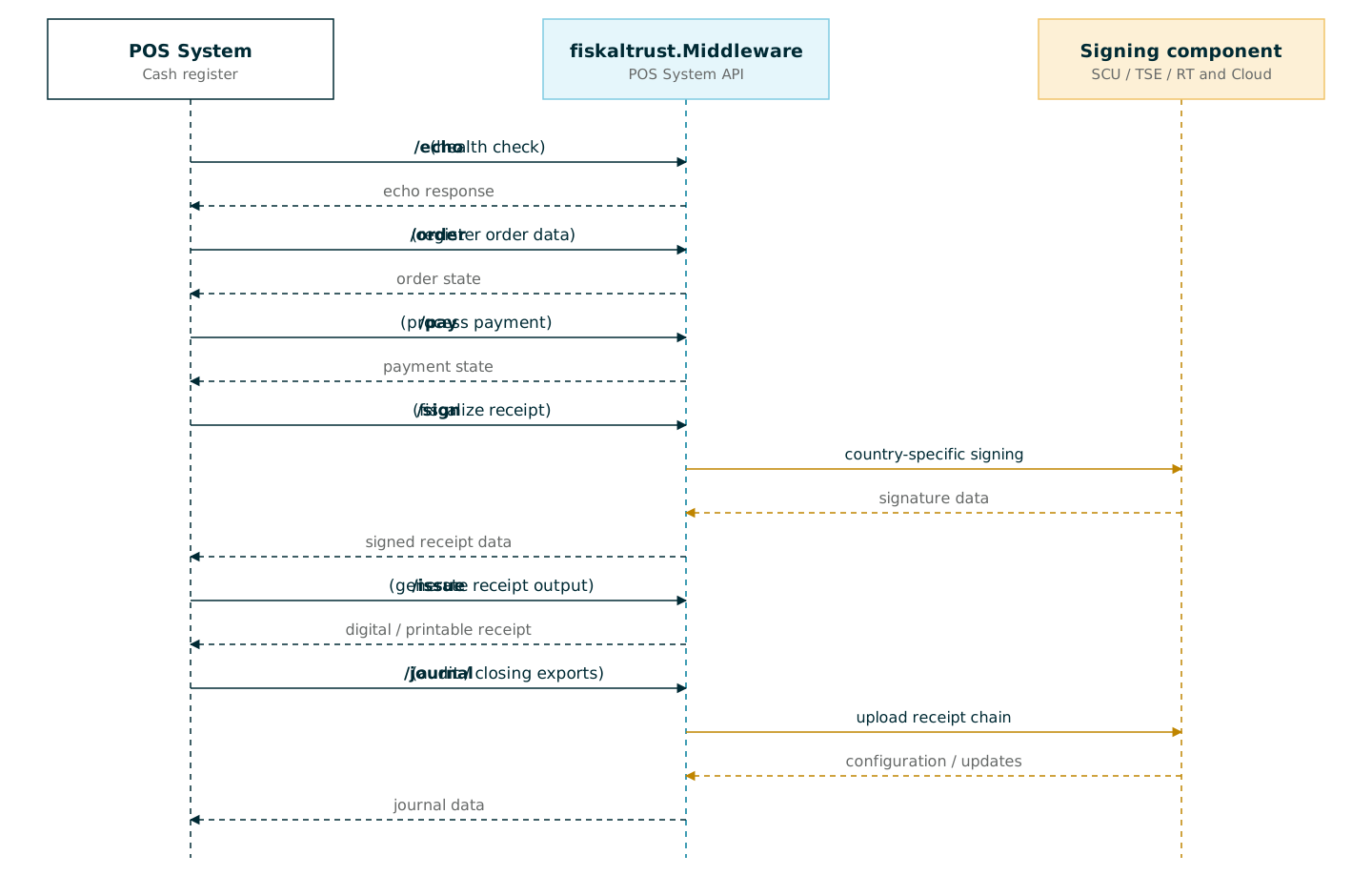
Figure 1. End-to-end flow of a fiscal transaction between the POS system, the fiskaltrust.Middleware, signing components, and the fiskaltrust.Cloud.
Every request carries the same identification and authentication headers (x-cashbox-id, x-cashbox-accesstoken, x-possystem-id) plus a per-operation x-operation-id. The x-operation-id is what makes each step safe to retry without producing duplicate fiscal actions.
When /pay is part of the flow, the ftPayItems array returned by /pay can be reused directly as cbPayItems in the subsequent /sign request — no transformation needed. This links the fiscal receipt to the electronic payment without the POS having to re-map terminal data.
Availability
The POS System API is available in every supported fiskaltrust deployment scenario: as a cloud-hosted endpoint and as part of the Local Middleware on Windows, Linux, and Android. The same v2 request format works across all of them, so a single POS integration runs unchanged regardless of where the Middleware is deployed. For more information about hosting options and per-market setup, see PosSystem API Platforms.
Versioning and Compatibility
The POS System API uses semantic versioning:
- Breaking changes are introduced only in major versions.
- Non-breaking changes may add fields without altering existing models.
- If no version is specified, the latest available version is used.
The currently published version and any prior major versions are shown in the version selector of the POS System API reference. Pinning to a specific major version is recommended for production integrations.
FAQ
Q: What is the difference between the POS System API and the fiskaltrust.Middleware?
A: The fiskaltrust.Middleware is the component that performs the actual fiscalization, signing, and journaling logic. The POS System API is the HTTP/JSON interface exposed by the Middleware that POS systems use to drive these operations. POS systems do not call signing components (SCU, TSE, RT, …) directly — they always interact with the Middleware through the POS System API.
Q: Do I need a different integration per country?
A: No. The POS System API is unified across markets and abstracts country-specific fiscal rules behind the same set of endpoints (/echo, /pay, /sign, /issue, /journal). Country-specific behaviour is driven by the CashBox configuration and the data sent in the requests, not by a separate API surface.
Q: What is x-operation-id used for, and how should it be generated?
A: x-operation-id is a unique identifier per logical operation that makes requests idempotent. If the same x-operation-id is sent twice (for example after a network timeout), the Middleware returns the result of the original operation or blocks until it completes, instead of executing the operation a second time. It should be a unique value per logical operation (typically a GUID/UUID) and must remain identical across retries of the same call.
Q: Is the POS System API safe to retry on network errors?
A: Yes. Retrying a request with the same x-operation-id and the same body is the recommended way to recover from transient network issues, timeouts, or interrupted responses without risking duplicate fiscal actions. If the body differs from the original, the retry is rejected with 409 Conflict.
Q: Where do I get x-cashbox-id, x-cashbox-accesstoken, and x-possystem-id?
A: These values are issued via the fiskaltrust Portal as part of configuring a CashBox and registering a POS system variant. They are tied to a specific CashBox configuration and must be stored securely on the POS side.
Q: Can /pay be used without /sign, or vice versa?
A: Each endpoint represents a step in the fiscal workflow and is intended to be used as part of the overall process. Which steps are required depends on the country-specific fiscal rules and the business case being executed. The combination of steps performed for a given transaction must result in a complete, traceable, and compliant chain.
Q: Can the same POS integration run against both the cloud endpoint and the Local Middleware?
A: Yes. All deployment scenarios — the cloud-hosted endpoint and the Local Middleware on Windows, Linux, and Android — accept the same v2 request format. A single POS integration works against any of them without code changes.
Q: How are breaking changes handled?
A: The API uses semantic versioning. Breaking changes are introduced only in major versions; non-breaking changes may add optional fields without altering existing models. If no version is specified, the latest available version is used, so pinning to a specific major version is recommended for production integrations.