InStore App 1.3.1


HomeScreen WebView configuration
The HomeScreen WebView can now be enabled and its URL configured per device directly in the local settings. When active, the blue header bar is hidden, letting the WebView run in true fullscreen. Settings and receipt history remain just a left-edge swipe away.

Settings access PIN
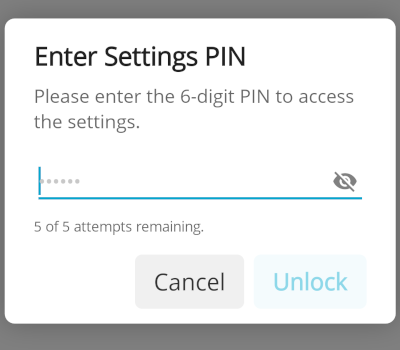
The settings page can now be locked with a 6-digit PIN, keeping unauthorized users like waiters from making configuration changes. Access is granted only after the correct PIN is entered, with a limit of 5 attempts per hour to deter brute-force attacks.
Affected issue(s): #699
UI/UX design refresh
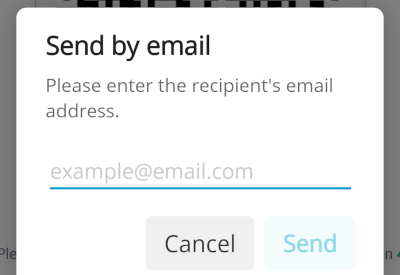
Continuation of the UI overhaul started in 1.3.0. The app's look and feel has been aligned with the new fiskaltrust design system, including a redesigned email and SMS input popups on the digital receipt screen. A new "Thank you" screen now closes the receipt flow, replacing the previous "Receipt was accepted..." notification which could appear on the wrong device in multi-terminal setups.
Affected issue(s): #581, #677, #678, #713
Other Changes
Improvements
Bug fixes
- [Payment] Progress screen is not usable on landscape screens (especially when they are small like on the Sunmi Smart Pad) + background color wrong #719
- [Payment] Worldline / PayOne SmartPOS - WPI Version Incompatibilities - TOM provides receipt as expected - SmartPOS uses new WPI_VERSION v2.2 format even if we request v2.1 -> moved to v2.2 for both integrations #696
- [Settings] When configuring a printer the Paper Width setting 48mm is not shown selected but can also not be clicked #695
- [Settings] Selecting a not available / turned off bluetooth printer - feels stuck - no info that we are trying to do a test printout #679
- [Printing] PayOne SmartPOS - Demo printout is not readable (looks like just some grey pixels in a single line) #734
- [Settings] app crash when deleting the tcp port for the network printer #736
- [Receipt] When using multiple devices with cbTerminalID configured still "Receipt was accepted..." message is shown on all devices and not just the one on which the receipt was accepted #713
- [Receipt] Consumer mode countdown is missing the "s" info just shows "... in 10" instead of "... in 10s" #735